
↑
Skip to Content

Other industries


Odoo helps companies across industries bring together customer and vendor management, sales, purchasing, inventory, projects, maintenance, and accounting. Its modular architecture lets you choose the apps you need, adapt them to your business, and connect processes in one system without duplicate data entry.

Other industries


Odoo helps companies across industries bring together customer and vendor management, sales, purchasing, inventory, projects, maintenance, and accounting. Its modular architecture lets you choose the apps you need, adapt them to your business, and connect processes in one system without duplicate data entry.


One system for companies across industries

Every company has its own processes and management needs. Some manage stock and orders, others deliver projects and services, and others combine sales, manufacturing, delivery, and equipment maintenance. When information is scattered across systems, it is harder to control deadlines, costs, and results.

Odoo lets you assemble the integrated apps you need. CRM and Sales handle customers and orders, Purchase and Inventory manage purchasing and stock, Project, Planning, and Field Service cover projects, resources, and on-site work, and Accounting manages invoices, payments, and financial accounting.

Documents and Sign organize document storage and signing. Additional configuration, industry modules, and integrations adapt the system to each company's needs.

One system for companies across industries

Every company has its own processes and management needs. Some manage stock and orders, others deliver projects and services, and others combine sales, manufacturing, delivery, and equipment maintenance. When information is scattered across systems, it is harder to control deadlines, costs, and results.

Odoo lets you assemble the integrated apps you need. CRM and Sales handle customers and orders, Purchase and Inventory manage purchasing and stock, Project, Planning, and Field Service cover projects, resources, and on-site work, and Accounting manages invoices, payments, and financial accounting.

Documents and Sign organize document storage and signing. Additional configuration, industry modules, and integrations adapt the system to each company's needs.


Which processes Odoo supports

Odoo brings together customer management, projects, contractors, materials, field technicians, and financial documents.

Inquiries are recorded in CRM as leads or opportunities. Set the customer, salesperson, expected revenue, probability, planned closing date, and next activities, then create a quotation from the opportunity.

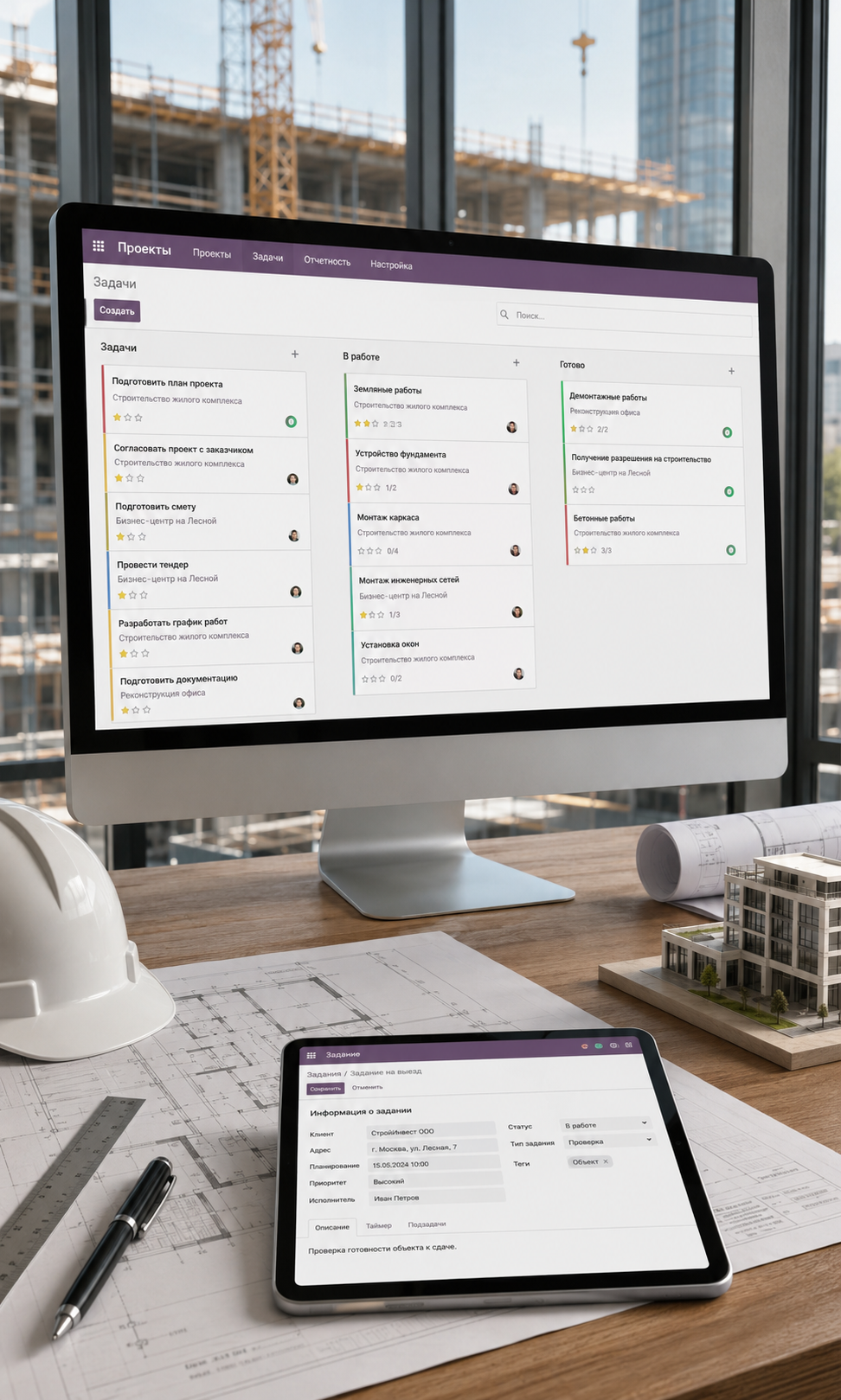
Project supports projects, stages, tasks, and subtasks. Tasks have assignees, deadlines, priorities, and dependencies. Milestones capture key outcomes and support phased invoicing.

Purchase creates requests for quotation and purchase orders. Orders record the vendor, materials or services, prices, and planned delivery dates. Once goods arrive, you can record the receipt and create a vendor bill.

Inventory manages stock levels, warehouses, locations, receipts, internal transfers, and material issues. Products can be tracked by lot or serial number when needed. Barcode enables scanner-based warehouse operations.

Field Service creates on-site tasks with the customer, address, assignee, and scheduled date. Technicians can record time, materials used, results, and the customer's signature.

Documents centralizes contracts, designs, instructions, acceptance records, and supporting files. Sign prepares and sends documents for electronic signature.

When sales, purchases, timesheets, expenses, and financial documents link to a project and its analytic account, Odoo can use them to analyze project revenue, costs, and profitability.

Standard Rental supports rental orders, periods, handover, returns, and invoicing. Specialized long-term property rentals may need additional configuration or an industry extension.


Which processes Odoo supports

Odoo brings together customer management, projects, contractors, materials, field technicians, and financial documents.


Inquiries are recorded in CRM as leads or opportunities. Set the customer, salesperson, expected revenue, probability, planned closing date, and next activities, then create a quotation from the opportunity.

Project supports projects, stages, tasks, and subtasks. Tasks have assignees, deadlines, priorities, and dependencies. Milestones capture key outcomes and support phased invoicing.

Purchase creates requests for quotation and purchase orders. Orders record the vendor, materials or services, prices, and planned delivery dates. Once goods arrive, you can record the receipt and create a vendor bill.

Inventory manages stock levels, warehouses, locations, receipts, internal transfers, and material issues. Products can be tracked by lot or serial number when needed. Barcode enables scanner-based warehouse operations.

Field Service creates on-site tasks with the customer, address, assignee, and scheduled date. Technicians can record time, materials used, results, and the customer's signature.

Documents centralizes contracts, designs, instructions, acceptance records, and supporting files. Sign prepares and sends documents for electronic signature.

When sales, purchases, timesheets, expenses, and financial documents link to a project and its analytic account, Odoo can use them to analyze project revenue, costs, and profitability.

Standard Rental supports rental orders, periods, handover, returns, and invoicing. Specialized long-term property rentals may need additional configuration or an industry extension.

Two end-to-end processes in one system

Odoo connects sales, project, inventory, and financial data without repeated manual entry.

Two end-to-end processes in one system

Odoo connects sales, project, inventory, and financial data without repeated manual entry.

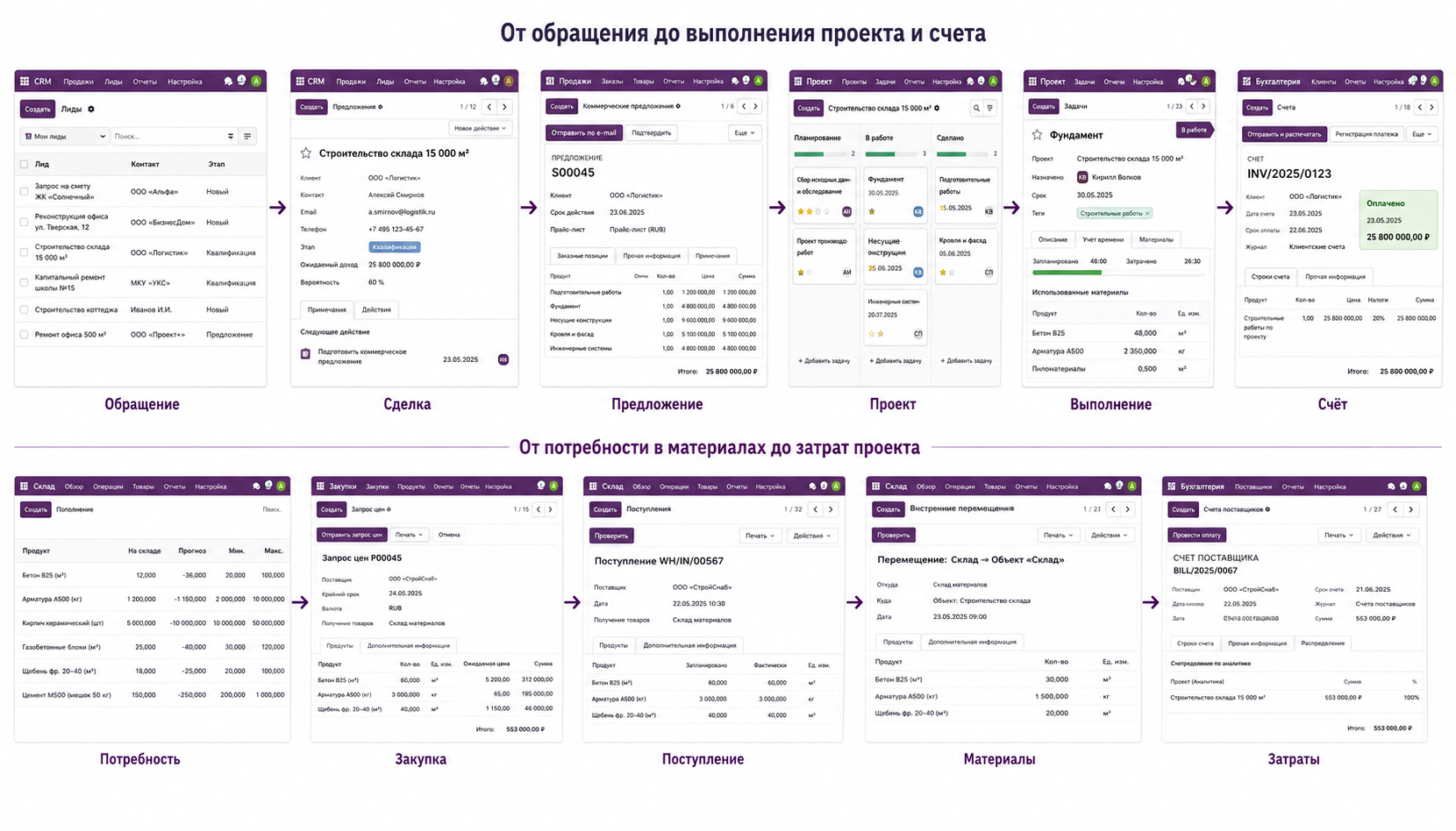
 Customer project: from inquiry to invoicing


Customer inquiries are recorded in CRM and follow configured opportunity stages. Once the quotation is agreed, an order is created and, where configured, a project with tasks. Assignees record time, materials, and expenses, and invoicing follows the agreed fixed-price, milestone, or actual-work model.

 Project materials: from purchasing to cost accounting


Materials and services are ordered through RFQs and purchase orders. Received goods are stocked and transferred to the required site. Purchases, stock operations, and vendor bills can be allocated to projects through configured analytics.

 Customer project: from inquiry to invoicing


Customer inquiries are recorded in CRM and follow configured opportunity stages. Once the quotation is agreed, an order is created and, where configured, a project with tasks. Assignees record time, materials, and expenses, and invoicing follows the agreed fixed-price, milestone, or actual-work model.

 Project materials: from purchasing to cost accounting


Materials and services are ordered through RFQs and purchase orders. Received goods are stocked and transferred to the required site. Purchases, stock operations, and vendor bills can be allocated to projects through configured analytics.


Projects, deadlines, and profitability

Answers to key questions about online booking, service delivery, purchasing, traceability, quality, equipment, and accounting.

Yes. Appointments defines booking types and calculates available times from assigned employees' or resources' availability.

Yes. Requests are recorded in Helpdesk and follow support team stages. Tickets can create Field Service tasks. Field tasks can also be created manually or from sales orders.

Yes. Inventory supports lot and unique serial number tracking. These identifiers follow products through stock movements.

Yes. Tracked products can have expiration, removal, and alert dates. FEFO uses the removal date to determine picking order.

Yes. Quality creates individual checks or control points that automatically generate checks for selected operations.

Yes, when manufacturing is in use. PLM handles engineering changes through ECOs, approval stages, and bill of materials versioning.

Yes. Maintenance supports preventive and corrective requests, responsible teams, progress stages, and a maintenance calendar.

Yes. Documents stores, previews, and organizes files. Access rules, workspace structures, and approval procedures should reflect the organization's internal requirements.


Projects, deadlines, and profitability

Answers to key questions about online booking, service delivery, purchasing, traceability, quality, equipment, and accounting.


Yes. Appointments defines booking types and calculates available times from assigned employees' or resources' availability.

Yes. Requests are recorded in Helpdesk and follow support team stages. Tickets can create Field Service tasks. Field tasks can also be created manually or from sales orders.

Yes. Inventory supports lot and unique serial number tracking. These identifiers follow products through stock movements.

Yes. Tracked products can have expiration, removal, and alert dates. FEFO uses the removal date to determine picking order.

Yes. Quality creates individual checks or control points that automatically generate checks for selected operations.

Yes, when manufacturing is in use. PLM handles engineering changes through ECOs, approval stages, and bill of materials versioning.

Yes. Maintenance supports preventive and corrective requests, responsible teams, progress stages, and a maintenance calendar.

Yes. Documents stores, previews, and organizes files. Access rules, workspace structures, and approval procedures should reflect the organization's internal requirements.


Projects, deadlines, and profitability

Projects, deadlines, and profitability

 Construction project monitoring


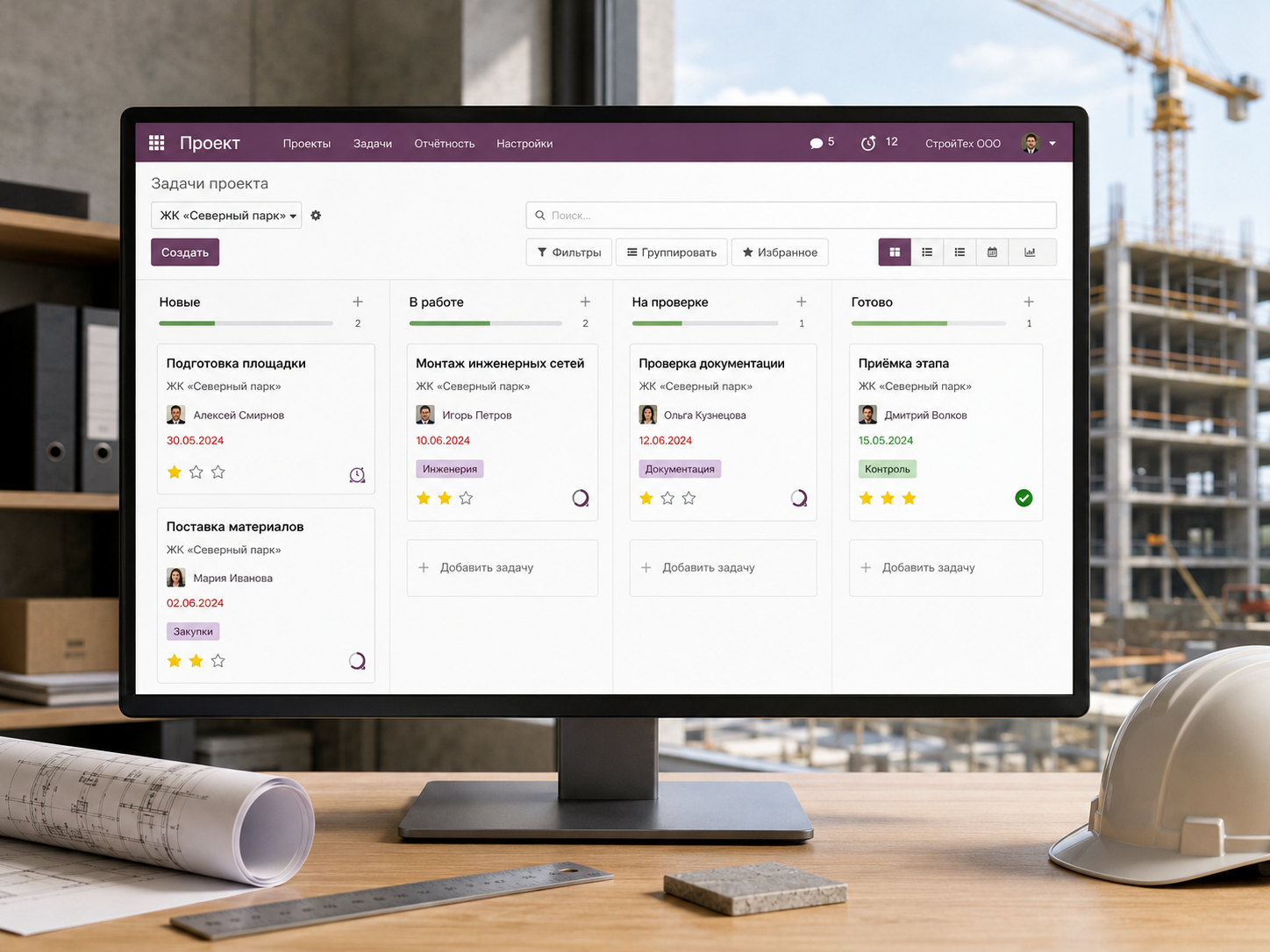
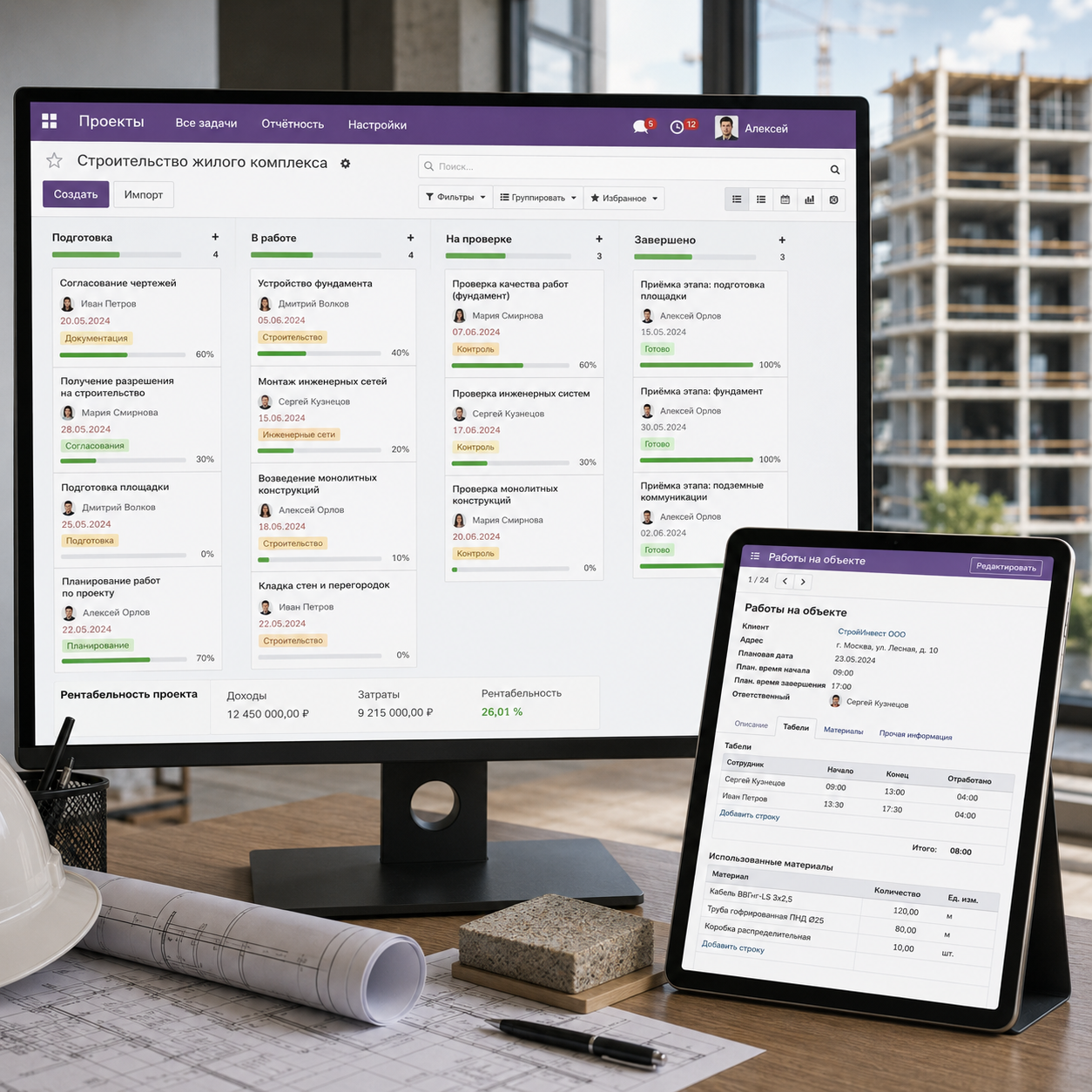
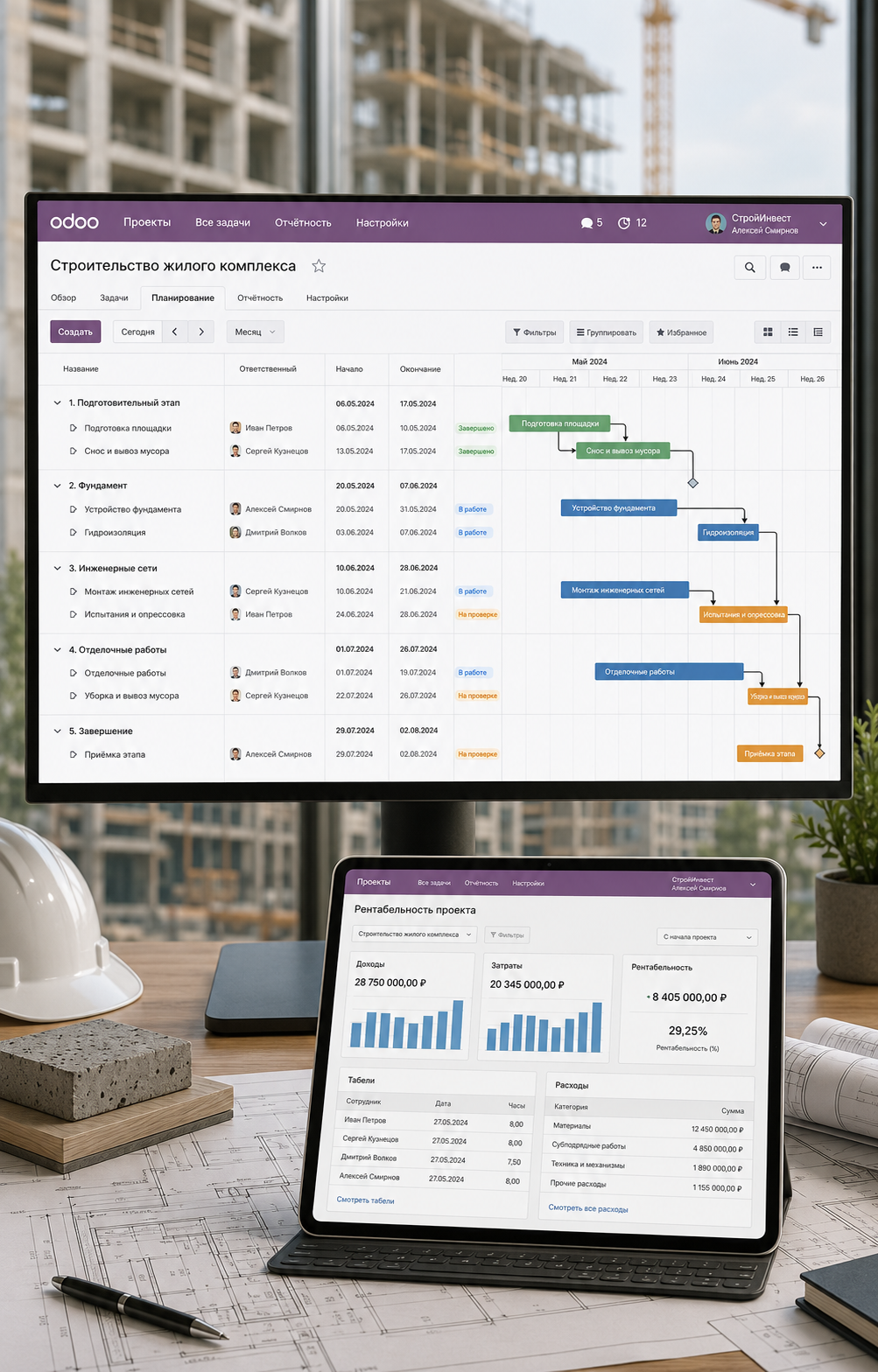
Odoo Project divides work into stages, tasks, and subtasks, with assigned owners and deadlines. Dependencies specify which tasks must finish before others begin, while milestones capture key project outcomes.

 Time and expense tracking


Employees can track time by project and task. Transport, accommodation, materials, and other costs use Expenses, Purchase, Inventory, or Accounting according to the transaction type.

 Construction project monitoring


Odoo Project divides work into stages, tasks, and subtasks, with assigned owners and deadlines. Dependencies specify which tasks must finish before others begin, while milestones capture key project outcomes.

 Time and expense tracking


Employees can track time by project and task. Transport, accommodation, materials, and other costs use Expenses, Purchase, Inventory, or Accounting according to the transaction type.

Project profitability


The profitability dashboard compares revenue and costs linked to the project and its analytic account. Depending on apps and configuration, calculations can include sales, purchases, timesheets, expenses, customer invoices, and vendor bills.

 Planned versus actual performance


With analytic accounting and budgets configured, compare targets with actual revenue and expenses by project or business area.

Project profitability


The profitability dashboard compares revenue and costs linked to the project and its analytic account. Depending on apps and configuration, calculations can include sales, purchases, timesheets, expenses, customer invoices, and vendor bills.

 Planned versus actual performance


With analytic accounting and budgets configured, compare targets with actual revenue and expenses by project or business area.

Sales, rentals, and property management

Sales, rentals, and property management

A unified customer history


CRM can manage sales, rental, and service opportunities. Each opportunity record stores the customer, assigned salesperson, communication history, planned activities, documents, and quotations.

Contracts and documents


Link quotations, contracts, plans, acceptance records, and other files to customers, opportunities, or projects. Documents organizes files, while Sign sends them for signature.

A unified customer history


CRM can manage sales, rental, and service opportunities. Each opportunity record stores the customer, assigned salesperson, communication history, planned activities, documents, and quotations.

Contracts and documents


Link quotations, contracts, plans, acceptance records, and other files to customers, opportunities, or projects. Documents organizes files, while Sign sends them for signature.

Rental


Manage equipment, tool, vehicle, and other rentals in Odoo. Check period availability, create orders, track handover and returns, and invoice customers. Industry configuration and modules can extend the process.

Rental


Manage equipment, tool, vehicle, and other rentals in Odoo. Check period availability, create orders, track handover and returns, and invoice customers. Industry configuration and modules can extend the process.


Odoo for different industries

Answers to key questions about industry-specific configuration, automation, integrations, and further solution development.

Yes. Standard apps can be extended with custom fields, forms, and views. Specialized requirements use additional configuration, industry modules, or custom development.

Connect sales, purchasing, inventory, manufacturing, projects, service, HR, and accounting in one system. The app selection depends on your company's needs.

Yes. Start with core processes and add apps as the project develops. Define the overall architecture and data structure in advance.

Yes. Data exchange can use APIs, webhooks, and dedicated integration modules. Available methods depend on the Odoo version, plan, and hosting environment.

Yes. Multiple companies can share one database with separate user access, warehouses, documents, and operations for each legal entity. Availability depends on the plan.

Yes. Odoo assigns owners, creates approval requests, sends notifications, and runs automated actions. Complex sequential workflows may need additional configuration.

Development may be needed for specialized industry registers, unusual calculations, government system integrations, or nonstandard document logic. The scope is defined after reviewing company processes.


Odoo for different industries

Answers to key questions about industry-specific configuration, automation, integrations, and further solution development.


Yes. Standard apps can be extended with custom fields, forms, and views. Specialized requirements use additional configuration, industry modules, or custom development.

Connect sales, purchasing, inventory, manufacturing, projects, service, HR, and accounting in one system. The app selection depends on your company's needs.

Yes. Start with core processes and add apps as the project develops. Define the overall architecture and data structure in advance.

Yes. Data exchange can use APIs, webhooks, and dedicated integration modules. Available methods depend on the Odoo version, plan, and hosting environment.

Yes. Multiple companies can share one database with separate user access, warehouses, documents, and operations for each legal entity. Availability depends on the plan.

Yes. Odoo assigns owners, creates approval requests, sends notifications, and runs automated actions. Complex sequential workflows may need additional configuration.

Development may be needed for specialized industry registers, unusual calculations, government system integrations, or nonstandard document logic. The scope is defined after reviewing company processes.


Which Odoo apps you will need

The solution scope depends on your company's processes. The core package connects opportunities, construction projects, purchasing, materials, and accounting. Additional apps provide resource planning, field service, document management, rental, and equipment maintenance.


Core package

    CRM — inquiries, opportunities, and sales pipelines.

    Sales — quotations, orders, and sales terms.

    Project — projects, stages, tasks, and dependencies.

    Timesheets — working time records.

    Purchase — procurement of materials and contractor services.

    Inventory — warehouses, materials, and stock movements.

    Accounting or Invoicing — invoices, payments, and financial accounting.


Recommended apps

    Planning — employee and resource scheduling.

    Field Service — on-site work and materials used.

    Expenses — employee travel and other expenses.

    Documents — storage for contracts, drawings, and acceptance documents.

    Sign — electronic document signing.

    Website — corporate websites and property pages.

    Barcode — warehouse operations with a scanner.


Optional apps

    Rental — standard rental orders and return tracking.

    Maintenance — servicing construction and technical equipment.

    Helpdesk — warranty and service inquiries.

    Approvals — internal approval of requests and expenses.

    Fleet — company vehicles, drivers, contracts, maintenance, and costs.

   Studio or industry modules — specialized property and construction process management.

Which Odoo apps you will need

The solution scope depends on your company's processes. The core package connects opportunities, construction projects, purchasing, materials, and accounting. Additional apps provide resource planning, field service, document management, rental, and equipment maintenance.


Core package

    CRM — inquiries, opportunities, and sales pipelines.

    Sales — quotations, orders, and sales terms.

    Project — projects, stages, tasks, and dependencies.

    Timesheets — working time records.

    Purchase — procurement of materials and contractor services.

    Inventory — warehouses, materials, and stock movements.

    Accounting or Invoicing — invoices, payments, and financial accounting.


Recommended apps

    Planning — employee and resource scheduling.

    Field Service — on-site work and materials used.

    Expenses — employee travel and other expenses.

    Documents — storage for contracts, drawings, and acceptance documents.

    Sign — electronic document signing.

    Website — corporate websites and property pages.

    Barcode — warehouse operations with a scanner.


Optional apps

    Rental — standard rental orders and return tracking.

    Maintenance — servicing construction and technical equipment.

    Helpdesk — warranty and service inquiries.

    Approvals — internal approval of requests and expenses.

    Fleet — company vehicles, drivers, contracts, maintenance, and costs.

   Studio or industry modules — specialized property and construction process management.

Book an Odoo demo with an analyst today 

Discover how Odoo can help your business grow.

Request a demo

Book 

an Odoo demo with

an analyst today 

Discover how Odoo can help your business grow.

Request a demo